A calculator for 3D printers

Pricing as material × 5
and ending up in the red?

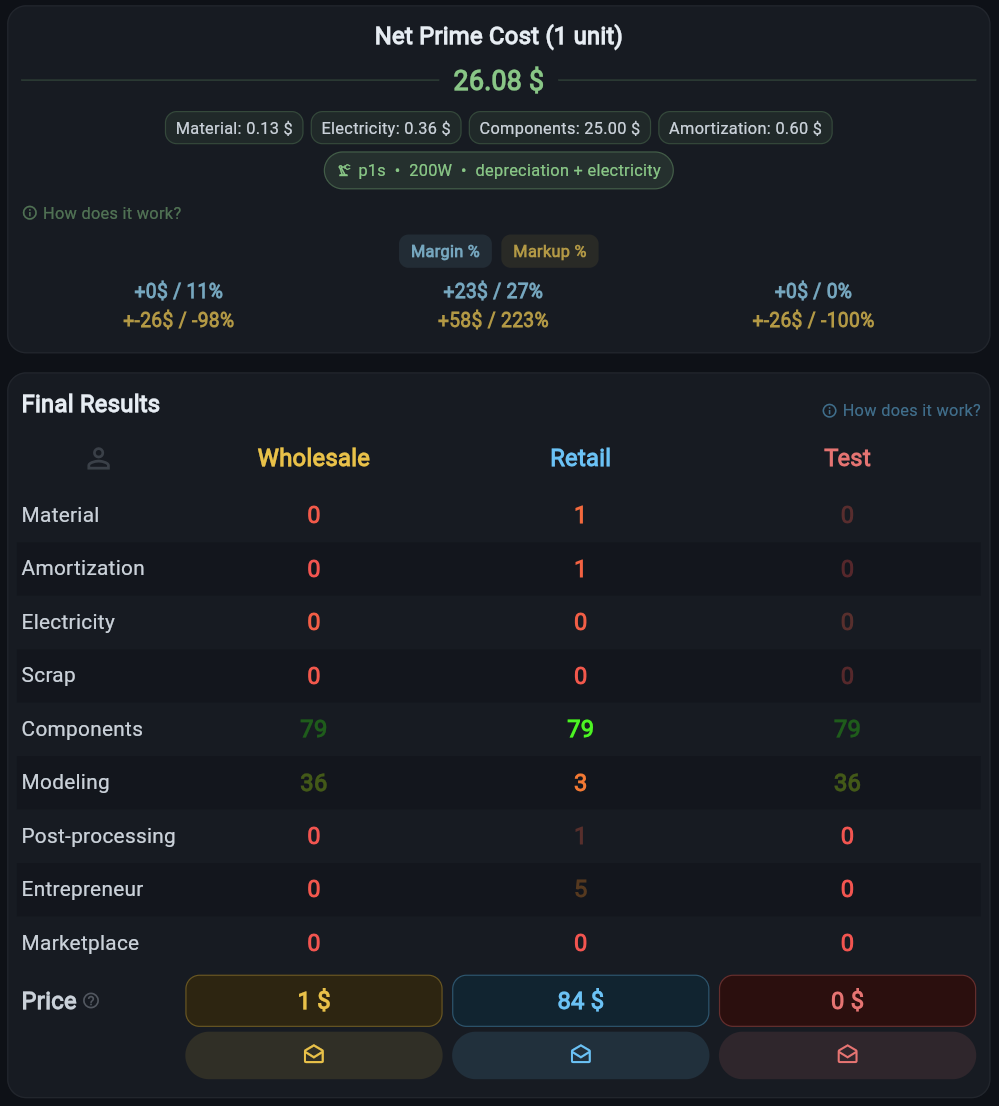
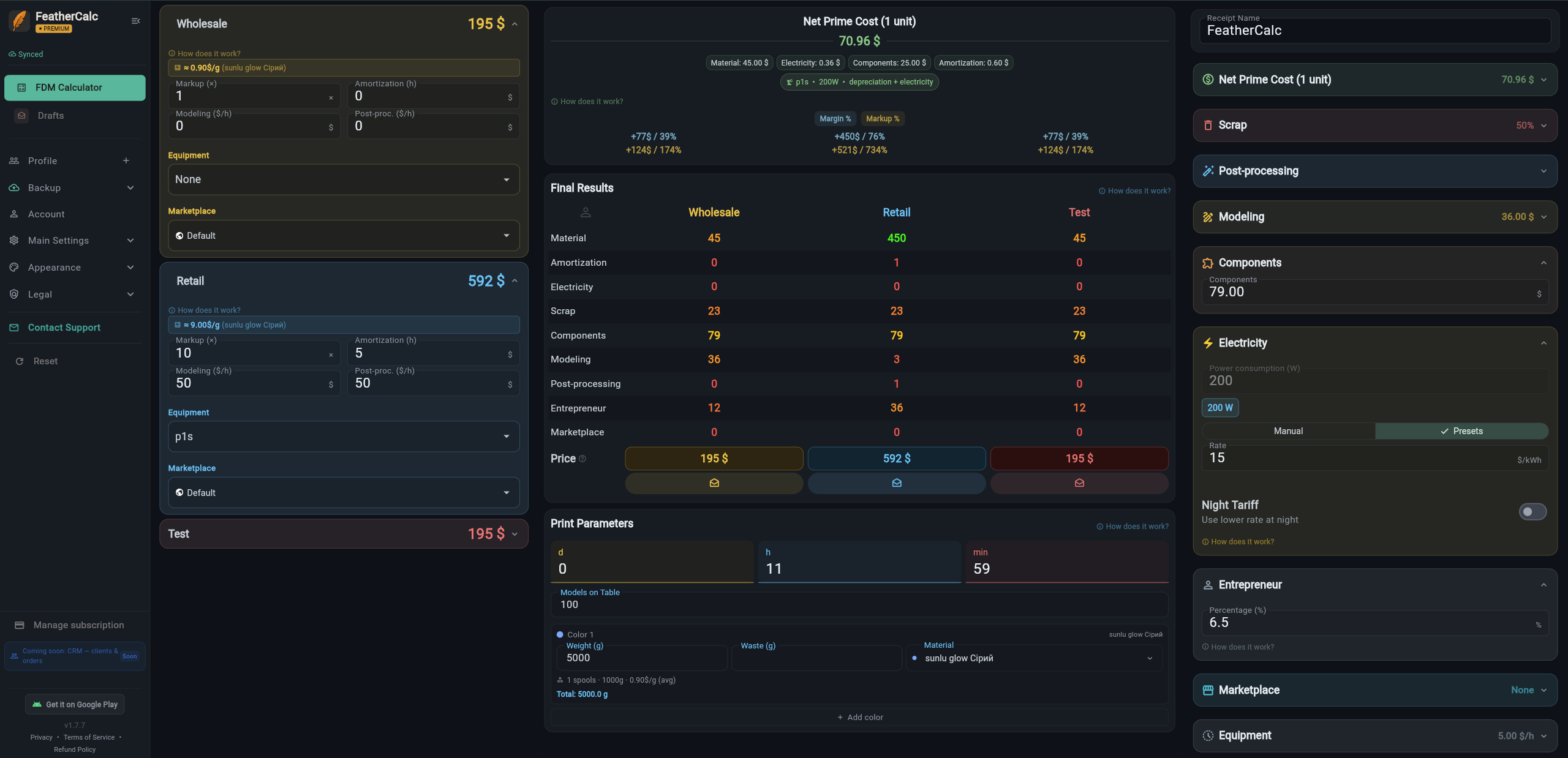
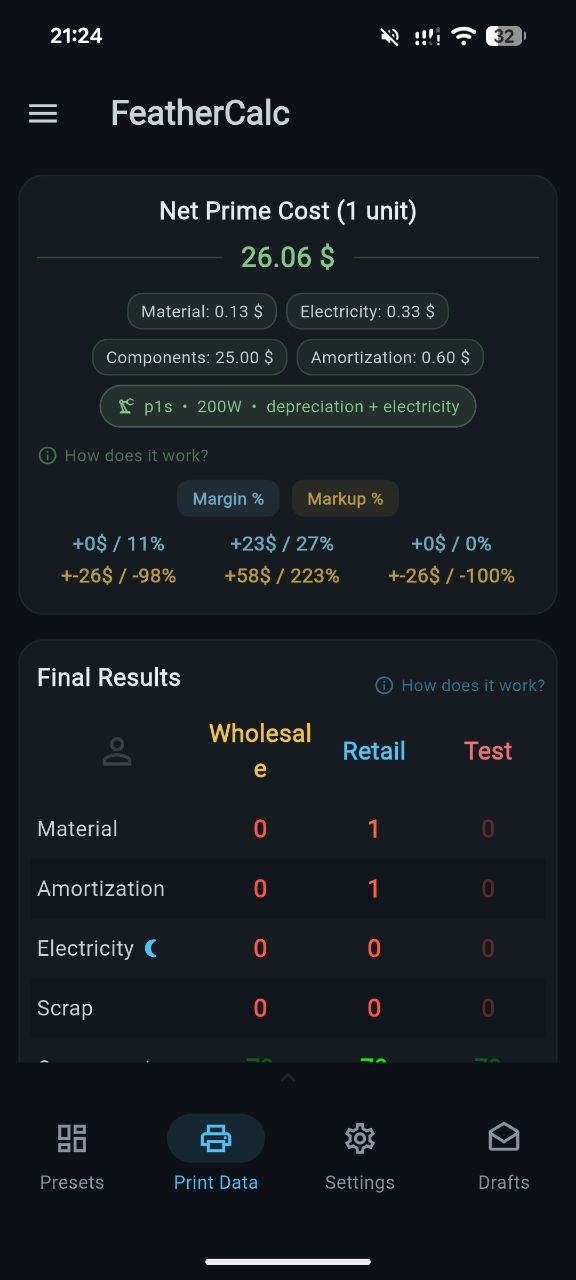
FeatherCalc shows the real cost of 3D printing — with depreciation, electricity, defects, modeling, and everything you forget to factor in. Then it gives you three prices at once: wholesale, retail, test.
📱 Android + Web 🌍 7 languages 🎨 5 themes
FeatherCalc — full 3D printing calculator interface
FeatherCalc — mobile version

What you forget to factor
into your print price?

Most 3D printers price like this: filament weight × multiplier. That's it. And then they wonder why there's less money at the end of the month than expected.

Printer depreciation
Printers don't last forever. Every print hour is wear. Without this in your price, you're paying for the next printer out of your own pocket.
Electricity
Especially with overnight prints and high-power machines. Day vs. night tariffs make a significant difference.
Defects
On complex models the defect rate can be 30–50%. If it's not in the price, you're printing for free.
Modeling and post-processing
Time spent on design, sanding, painting. Your time costs money too — people just often forget to count it.
Components
Magnets, screws, stickers, packaging. Small things that add up to serious money at scale.
Taxes and fees
Marketplaces take 5–20% off each sale. Self-employment tax. Without these, you're in the red before you even print.
Without these components, your "margin" is just an illusion

Three steps to an accurate price

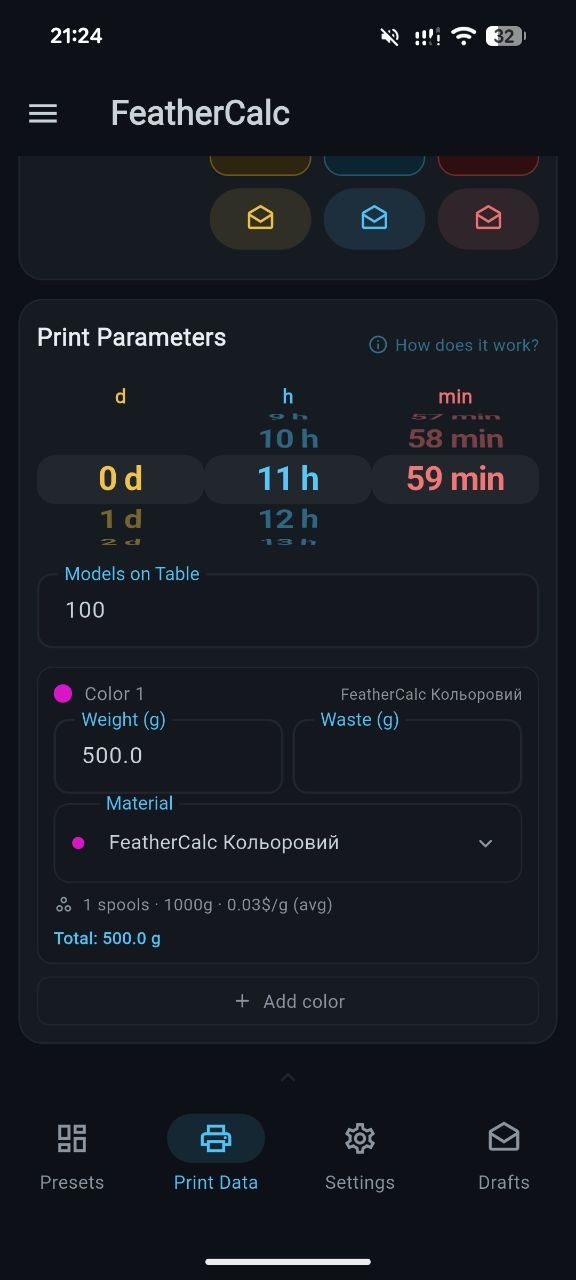
No tables, formulas, or dozens of open tabs. Everything on one screen.

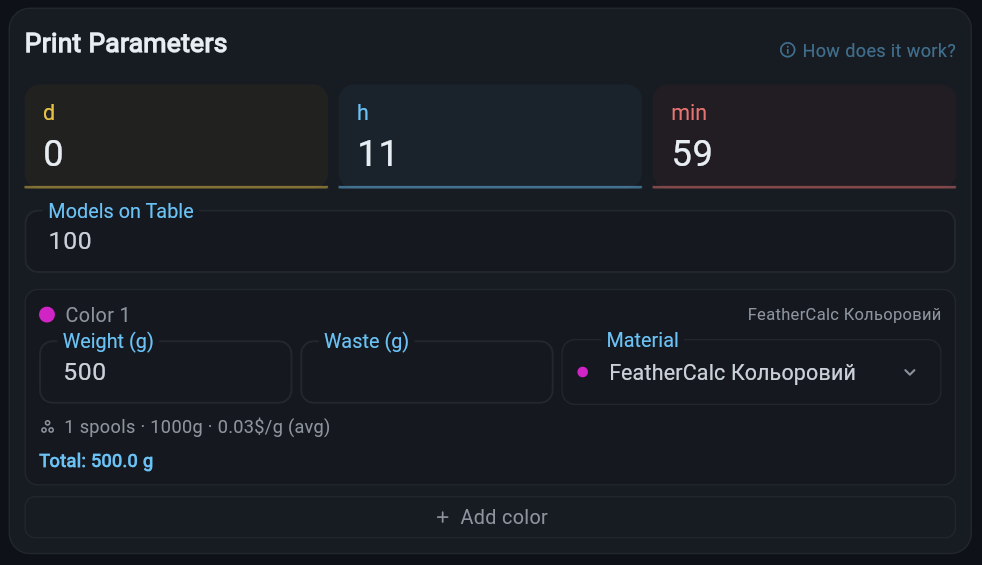
Entering print parameters
STEP 01
Enter print parameters
Print time (days / hours / minutes), material weight, colors. You can add multiple materials — they're calculated using a weighted average price.
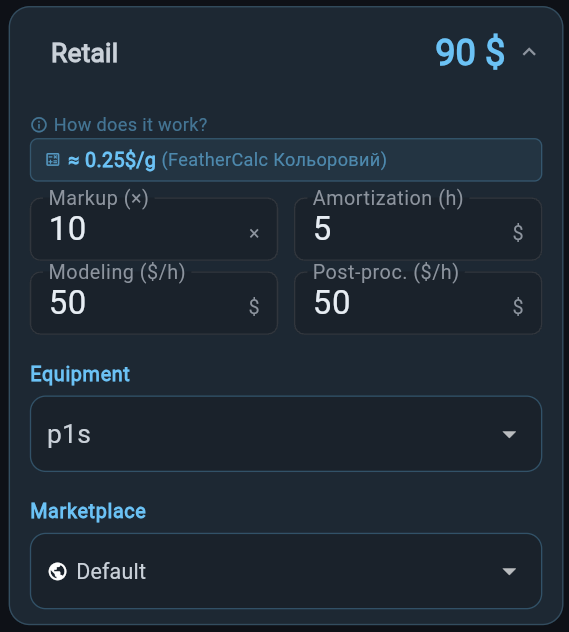
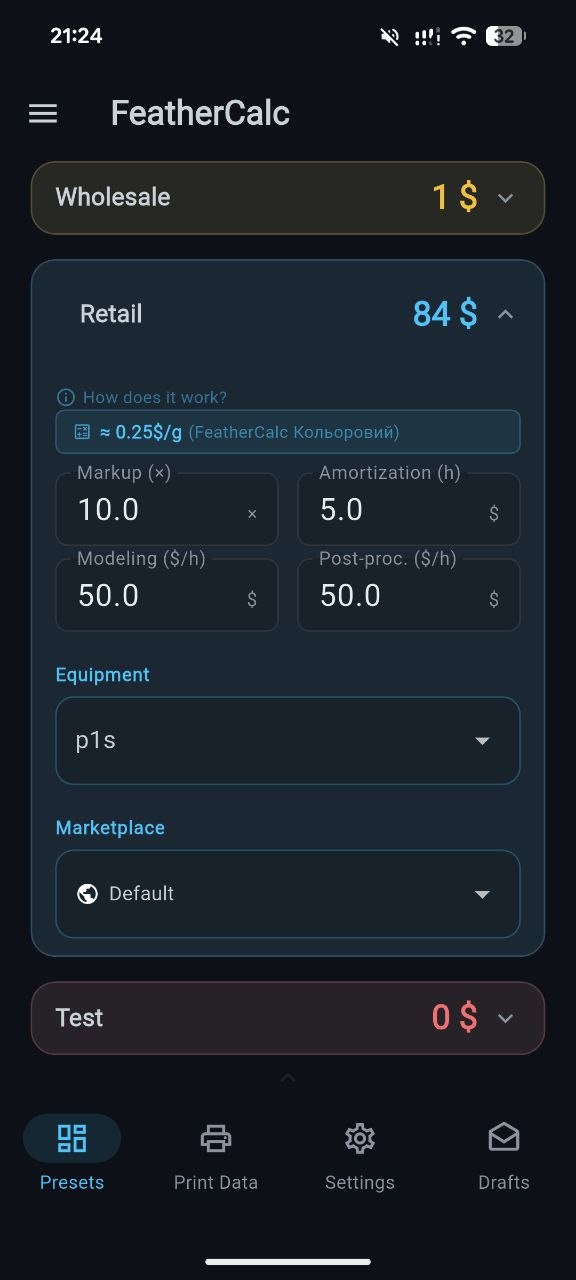
Configuring presets
STEP 02
Configure presets
Wholesale, Retail, Test — each with its own markup, equipment, material, and marketplace. Set it once — it works forever.
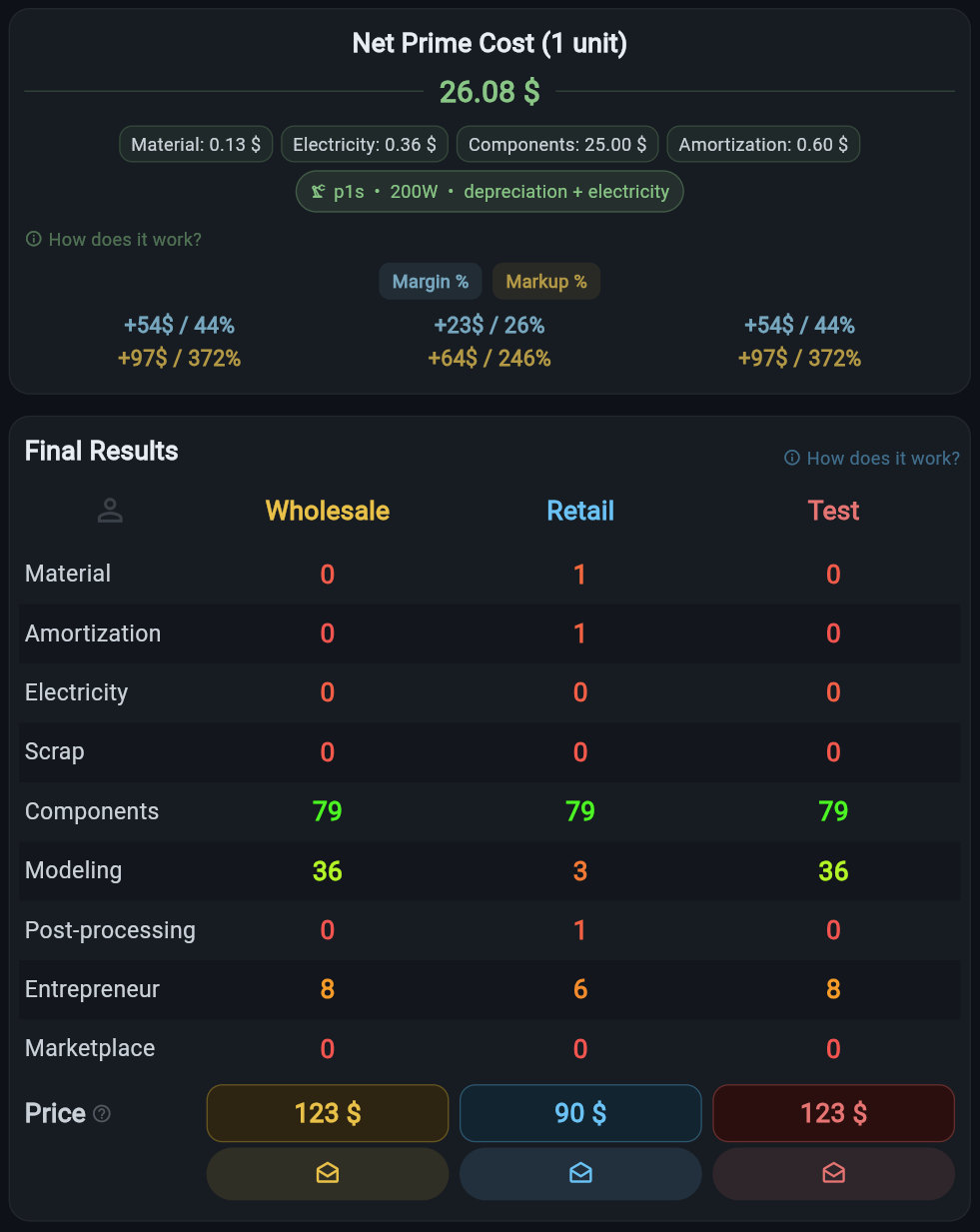
Final results with all prices
STEP 03
Get all prices at once
See cost, margin, and markup (% and currency) for every preset simultaneously. Tap a price — the receipt is copied to your clipboard.

Everything you need for
accurate pricing

Built by printers for printers. Every feature comes from real-world experience.

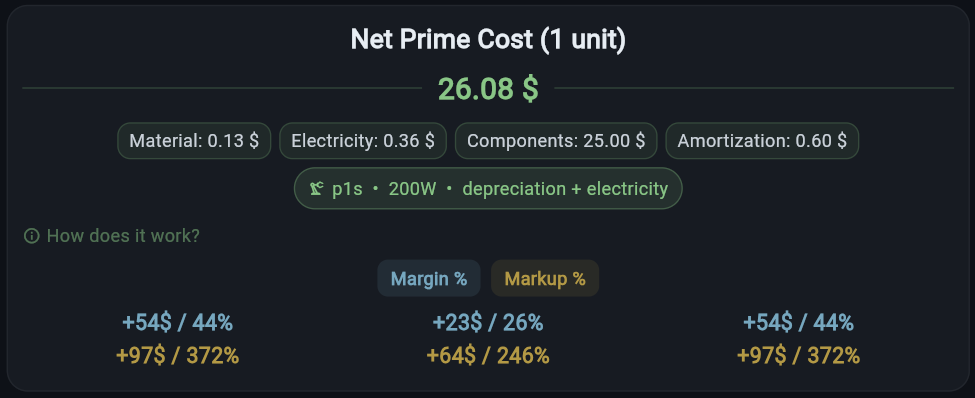
True cost with all components
True cost

True cost across all components

Not just "material × multiplier". FeatherCalc breaks each item down into all its parts so you know exactly what your print actually costs.

  • Material with multi-color support
  • Electricity with night tariff
  • Equipment depreciation per hour
  • Modeling and post-processing
  • Components (magnets, packaging, etc.)
3 presets at once — wholesale, retail, test
3 presets

Wholesale, Retail, and Test — on a single screen

FeatherCalc's signature feature. No switching tabs, no recalculating for each customer type. Configure once — see all three prices at the same time.

  • Custom markup for each preset
  • Custom equipment and materials
  • Separate marketplace and fees
  • Preset names can be customized to your needs
  • Tap a price — the receipt is copied to your clipboard
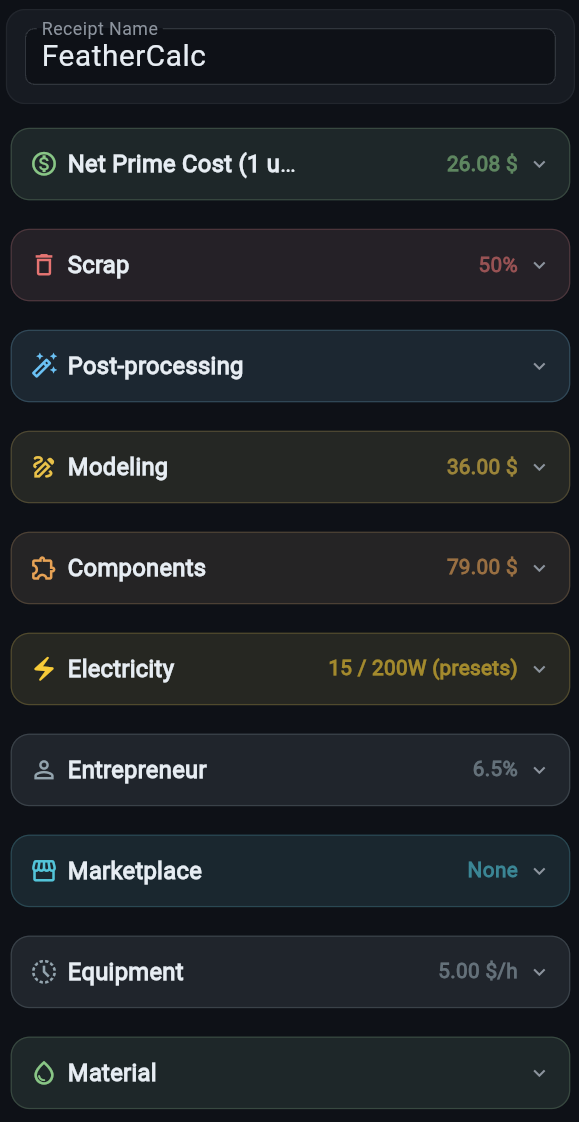
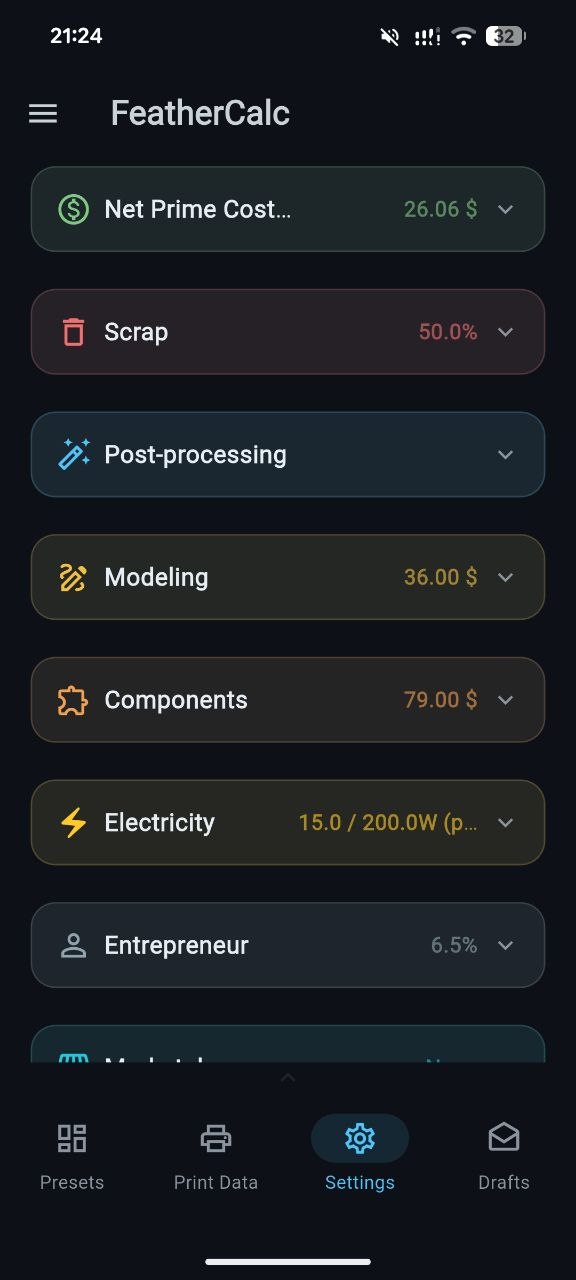
Expanded list of settings blocks
Flexibility

Tailored to your real-world workshop

FeatherCalc isn't a "one-size-fits-all" calculator. You configure each component for your shop: your equipment, your materials, your rates.

  • Separate blocks: defects, modeling, post-processing, components
  • Toggle items on/off — no need to type zeros all over
  • Custom defect % for each product type
  • Self-employment tax (% from sales)
  • Marketplaces with their own fees
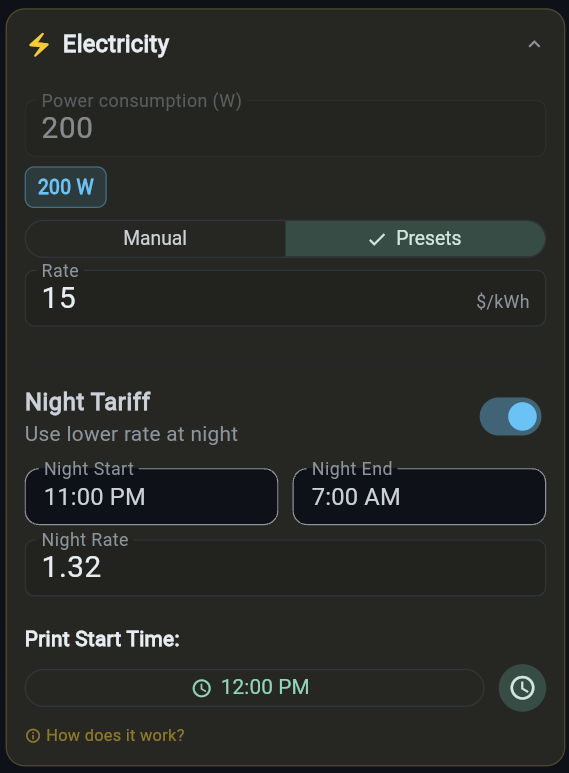
Electricity and night tariff settings
Electricity

Night tariff calculated automatically

Print at night because it's cheaper? FeatherCalc figures out how many print hours fall into the night tariff and applies it to that portion only.

  • Configurable start and end of the night period
  • Separate price per kWh for day and night
  • Print start time as the reference point
  • Compare tariffs across different printers
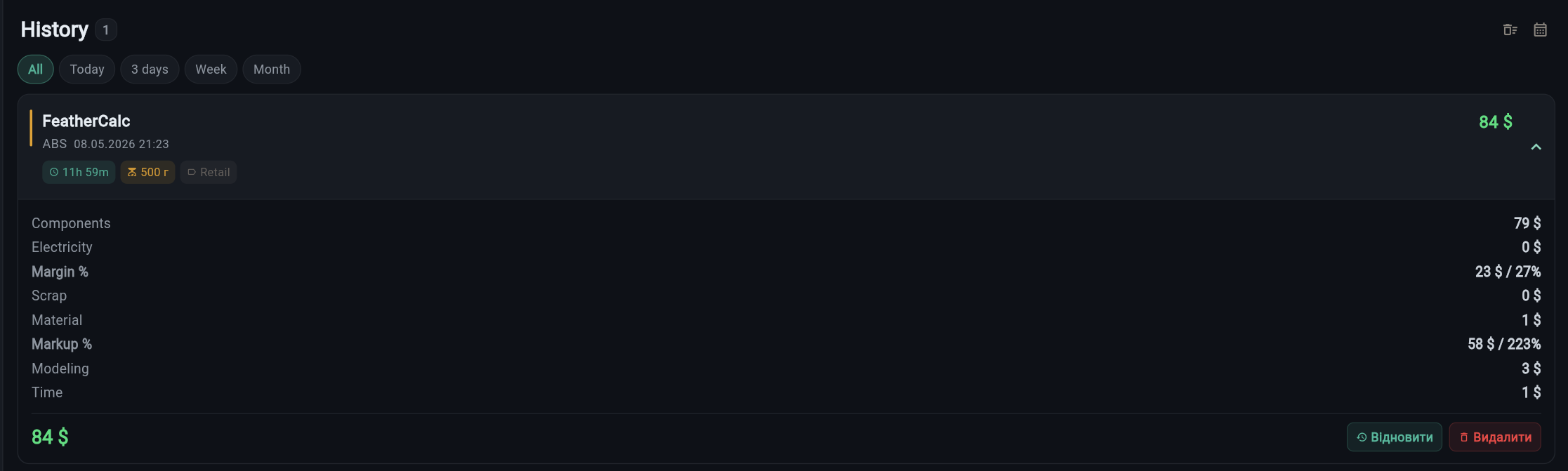
Drafts — history of calculated items
Drafts

Save calculations for later

Filament price went up next month? Open the draft, update — get a fresh accurate price. No need to recalculate from scratch.

  • Full calculation saved with all details
  • Filters: today / week / month
  • Quick restore for recalculation
  • Cost, margin, and markup visible at a glance

And many more useful things

Web + Android
Calculate from a laptop or right from your phone in the workshop next to the printer.
7 interface languages
UK, EN, ES, DE, PL, FR, RU — for working with international customers.
5 visual themes
Dark and light — pick what fits your taste and working conditions.
Equipment library
Add your printers with depreciation and compare which one is cheaper to print on.
Custom materials
A filament library with your prices and a markup for each preset.
Instant calculation
Any parameter change — and all prices update instantly. No "calculate" button.
UK EN ES DE PL FR RU
"Thanks for such a useful app! It's so convenient to enter all the data and get an accurate calculation 👌"
L
lovely.annet · Threads

FeatherCalc vs.
the usual ways

Why it's worth switching from an Excel sheet or a basic online calculator.

Feature
FeatherCalc
Basic online calculators
Excel spreadsheet
3 presets at once
Equipment depreciation
partial
Night electricity tariff
Calculation drafts
manually
Mobile app
Multiple languages and currencies
✓ 7 langs
partial
Time to calculate
~5 seconds
~30 seconds
5+ minutes

A calculator in your pocket

A native Android app — calculate prices right in the workshop next to your printer. All your data syncs between web and mobile.

True cost on Android
Print parameters on Android
Presets on Android
Settings on Android
Get it on Google Play →

Frequently asked questions

If you didn't find your answer — email us at support@feathercalc.com.

Does FeatherCalc work on iPhone?
Right now there's a native Android app and a web version that works great in iPhone Safari. You can "install" the web version as a home screen icon — it works almost like a native app. We're also actively working on an iOS app — it'll be available soon.
Is there an SLA printing calculator?
We're actively working on it — it'll be available soon.
How does FeatherCalc calculate depreciation?
You set the printer's cost (or the depreciation cost per hour) and its expected lifespan. The calculator automatically distributes the wear cost across the print time of each model. You can add multiple pieces of equipment and compare which is more profitable to print on.
Can I save my own materials?
Yes. You build your own filament library — brand, price per gram, name. For each preset (wholesale/retail/test) you can set an individual markup on the material.
What are "presets" and why three?
A preset is a saved set of pricing settings (markup, equipment, materials, marketplace). Three presets let you see different scenarios at once: wholesale clients — lower markup, retail — standard, test/personal orders — separate logic. Everything visible at a glance, no switching needed.
Which languages and currencies are supported?
The interface is translated into 7 languages: Ukrainian, English, Spanish, German, Polish, French, Russian. You can set your own currency — hryvnia, dollar, euro, zloty, etc.
Is the product still being developed?
Yes, continuously. We regularly add new features based on user feedback. Coming soon — a separate block for SLA printing. Follow our social media for updates.

Stop losing money
on 3D printing

Accurate price in 5 seconds. No tables, formulas, or "approximately".

One purchase — every platform. Buy the Android app and you automatically get the web version, and when the iOS app launches it'll be available at no extra cost.

Open FeatherCalc →